
Quality dashboards and KPIs
Dashboard is FactoryQA's home screen: one scorecard for every module, what needs you next, and eight analytics dashboards, from NCR trends to live SPC, all counted from your real records.
From your records to a decision.
Every module in one scorecard
Pick 30 days, 90 days or 12 months and see one row per module with its status. Click a row to open the records behind it.
- Nine modules, no scrolling
- Good, Watch or Attention on every row
- Counted from your records, never guessed
Eight dashboards, one click from home.
Open any of them from the home dashboard for trends, Pareto charts and drill-downs. Filter by factory and date, and export any page to PDF for a management review.
Issues
Open and overdue issues, how long they take to close, how often they come back, CAPA effectiveness and the cost of quality.
- Monthly NCR trend and a Pareto of causes
- Recurrence and CAPA effectiveness
- Cost of quality, drilled down to the issues
Inspection
Inspection volume, pass rate and first pass yield, with the parts behind every failed inspection. Filter by type, part, customer, family and dates.
- Volume, pass rate and first pass yield
- The parts behind failed inspections
- Filter by type, part, customer and family
SPC
Control charts for every characteristic against frozen limits, the rule signals that need a cause, and Cp, Cpk, Pp and Ppk for each one.
- X̄, R and EWMA charts
- Rule signals with the cause recorded
- Capability for every characteristic
Audits
Audit scores, open and high-risk findings and the compliance rate, with the findings that come up most and the ones that keep coming back.
- Scores and compliance rate
- Open and high-risk findings
- Most frequent and recurring findings
Suppliers
Supplier NCRs, open SCARs and how fast suppliers respond, next to a scorecard that compares every supplier on its latest evaluation.
- Supplier NCRs and open SCARs
- Response times
- A scorecard across every supplier
Delivery
Deliveries this month, the on-time (OTIF) rate against your target, late deliveries and the customers behind them.
- OTIF against your target
- Late deliveries by customer
- A PDF for customer scorecards
Calibration
How many gages are overdue or due soon, calibration compliance and out-of-tolerance rates, and the due schedule, with an on-time report to export.
- Overdue and due-soon gages
- Compliance and out-of-tolerance rates
- The due schedule, week by week
Maintenance
Which assets are likely to fail and why, readings drifting toward their limits, repair history, and how well PM work orders are kept.
- Assets at risk, with the reason
- Readings drifting toward limits
- PM compliance against a 90% target
Catch drift before it makes scrap.
Every reading your inspectors record is plotted on a live control chart. When a rule fires, the right people hear about it in minutes, and the cause goes on the chart for the next person who looks.
- Mean
- 12.7004
- StDev (within)
- 0.0012
- Cp
- 1.64
- Cpk
- 1.41
- Pp
- 1.58
- Ppk
- 1.36
SPC also feeds Quality Plans: each control plan line's Cpk suggests a tighter or less frequent check. See how the plan learns →
Problems find you, not the other way round.
Every record you save feeds the scorecard. When something is about to slip it shows on the Predictive tab and lands on an owner's task list.
See what needs you next
The Predictive tab ranks the signals most likely to need you, from a gage due for calibration to a work instruction review nobody has started.
- Signals from every module in one list
- Most urgent first
- One click to the record
- Most urgent
- Calibration · now
- Due this week
- 2 items
- Owner notified
- Yes
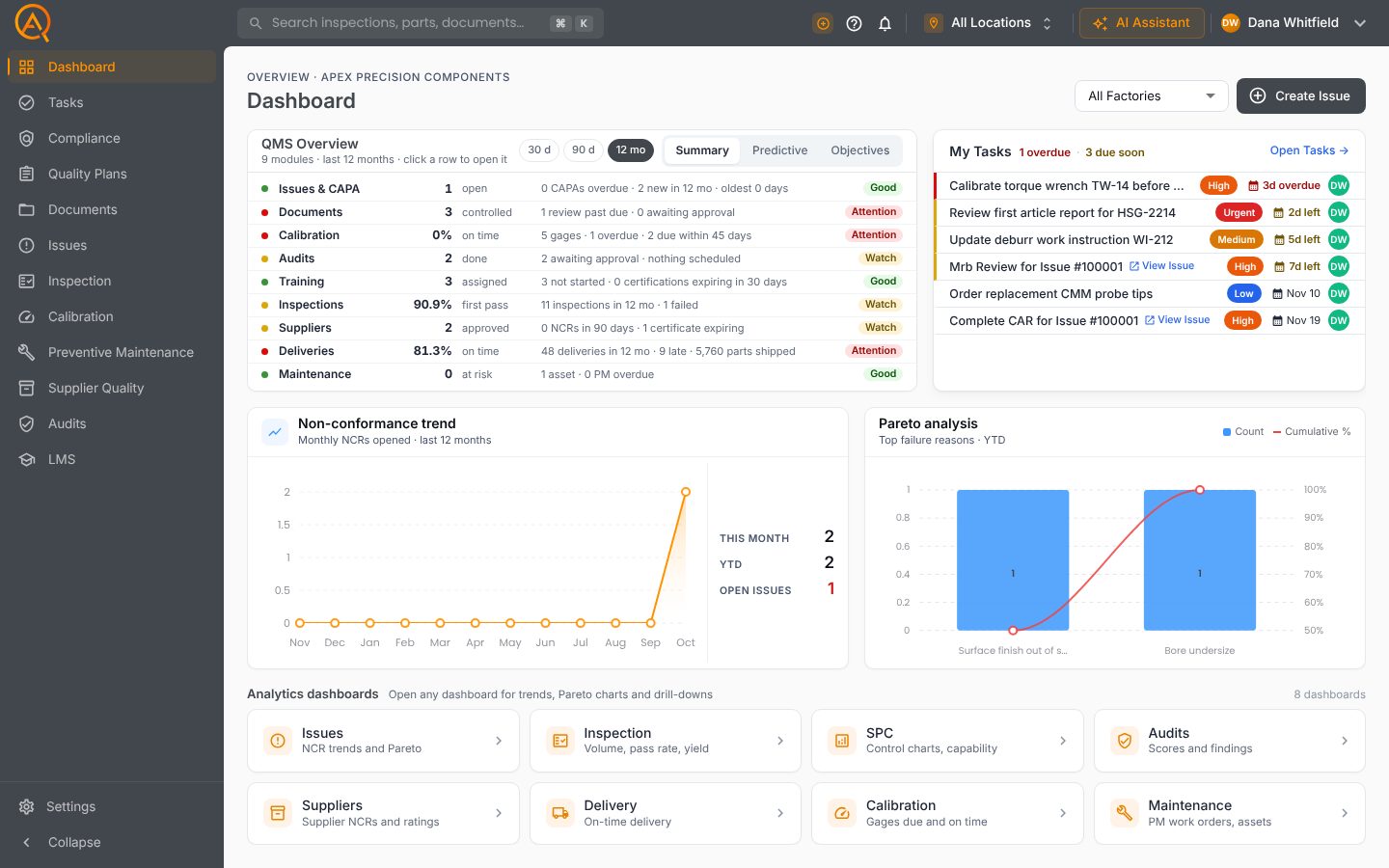
The dashboard, as your team sees it.
The QMS Overview, your tasks, NCR trends and every analytics dashboard on one screen.
Everything else you'd expect.
The full feature list, grouped by the job it does.
Home dashboard
- QMS Overview scorecard over 30 days, 90 days or 12 months
- Predictive tab of what is likely to need you
- My Tasks panel
- Nonconformance trend chart
- Pareto chart of failure reasons
- First wins checklist for new accounts
- Filter to one factory or all locations
Analytics dashboards
- Eight metrics pages, one click from the dashboard
- Audits: scores, high-risk findings and compliance rate
- Inspection: pass rate and first pass yield
- Calibration: overdue, due soon and out-of-tolerance rates
- Maintenance: assets at risk and readings drifting to limits
- Suppliers: NCRs, open SCARs and response times
- Customer complaints with top failure reasons
Delivery and reporting
- Delivery log with PO, dates and parts shipped
- On-time (OTIF) rate, worked out for you
- Late deliveries by customer and a monthly trend
- Quality objectives linked to live data
- Export any metrics page to PDF, with the sections you choose
- Ready for management review and customer meetings
AI in Dashboard.
Each tool drafts inside Dashboard, on your records. A person approves every change.
Counts, answers and quotes from your data.
An answer from the Help Center, with its source.
A new issue, filled in and ready to save.
Connected to every other module.
See Dashboard on your own parts and records.
Free plan · Basic $40 · Pro $60 per standard user per month · 14 days of Pro to start